Vodoo Child Remke by Griffon Quartet
Labels: Audio Engineering
posted by Henry Cole at Wednesday, May 23, 2007
0 comments

A page dedicated to work i have done am doing for university and general work outside of the university gates.
Labels: Audio Engineering
posted by Henry Cole at Wednesday, May 23, 2007
0 comments
Well I have now finished working on my tracks that will be handed in, these are a selection of covers and own material. I have used 5.1 stereo midi and real instruments to complete this task and feel have now mastered the system and programs that we use in the university studios.
I recorded the midi/5.1 track on my own however as was performing on a couple of the other tracks Lauren gave me a hand to record them. She has also used some of the tracks for her portfolio but mixed them in completely different ways.
The MIDI song was recorded in 5.1 as to kill two birds with one stone, it was a lot easier than I thought it would be, as the deadline crept up we had not learnt the techniques until three weeks ago which allowed us to either convert a stereo mix into 5.1 or record a song from scratch in 5.1. When recording we set the i/o settings to surround and set up midi and audio tracks this then left the writing of the song which was inspired by the music from a computer game but also I may use the audio to create a hip hop song when I get time to get a mc into the studio to rap on top of the tune.
There is no real difficulty when using midi as long as you get the midi channel and audio channel linked up together properly with the correct midi synthesizer plug ins that you wish to have.
I recorded this song trying to use as little effects upon the channels as possible a little reverb on the piano track however most of it was the instrument plugin I used.
The three other tracks have been recorded just using analogue instrument; these are all mixed in stereo. Unfortunately I had to record these songs twice due to the loss of my work on the faulty hard drive in the Bonnington studio; however, I now know the importance of backing up my work.
I recorded the tracks in one day as a live session which I then overdubbed the vocals on top of mix.
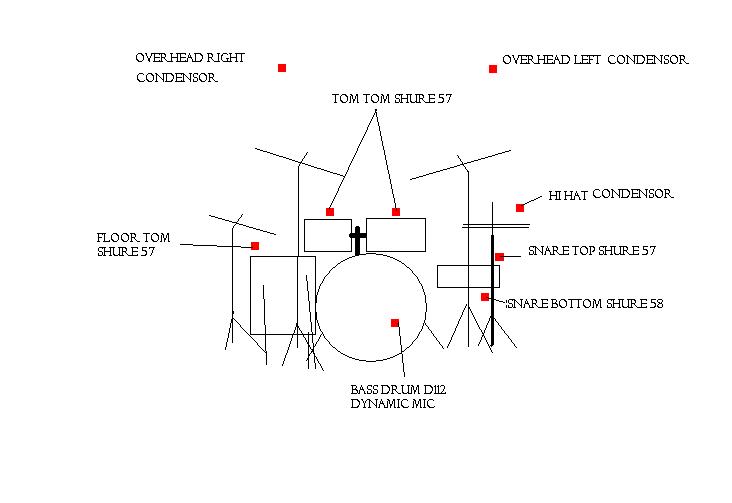
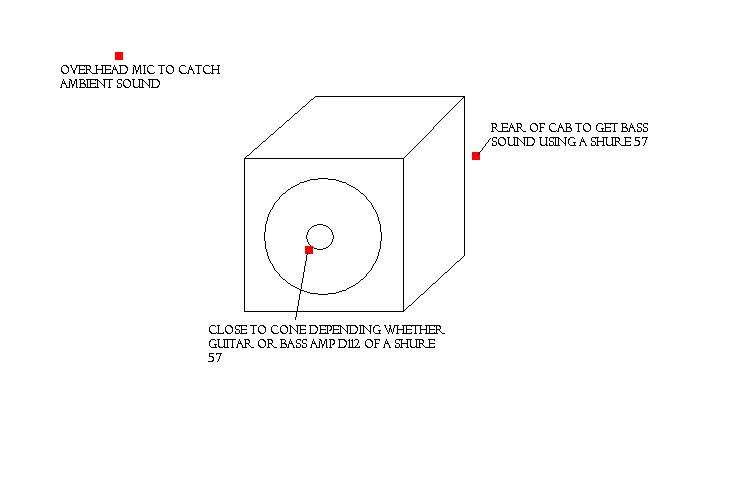
I decided to record the bass and guitar with several mics to get an ambient, both amps had a close and distant microphone, I put the drum kit in the other room as to reduce over spill. I used minimal mics on the drum kit I used two condenser overhead a d112 on the bass drum and a sm57 on the snare and high hat. For the bass guitar I used a d112 as a close mic and a sm57 as the far. For the guitar I placed a sm58 just off centre of the amps cone and another behind the cab to pick up more off the bass frequencies.
When over dubbing the vocals I used a rode NT1A which is one of my favourite condenser mics as for the money it gives a wonderful representation of what ever instrument or vocal line you are recording. Diagrams can be seen in the appendix.
To edit I took all the tracks home and worked on them using adobe audition which is not as good as protools however it was simpler as most of the tone I wanted from the instruments had been captured by the use of the amplifiers. I find editing in the studio or the booths difficult as when editing I need to be really relaxed and just sink into it easily and go and come back to it over a weekend, this is not really possible in Uni as everyone needs to be able to access the booths therefore time is of the essence. When editing I only had to EQ, compress and generally make sure the tracks sounded accurate. I also used automation on the panning and gain control of the channels this I feel gave a sense that the track you are listening to could be live with wailing guitar solos that move across from right to left and vice versa to giving the illusion that the guitarist is walking across the stage giving it his all. For the 5.1 I had to edit and master on the g5 in Bonnington as I have no DVD authoring software on my own pc, plus audition only allows you to edit in 5.1 if it recognizes a 5.1 set up on your pc.
After exporting the edited multitrack mix I did a little mastering in audition to do a final EQ and Compression to get the best sound to bounce onto a CD. Audition also has a editing tool that’s similar to Sound forge this just gives the end track that little bit extra.
End results are that the songs sound pretty good I am happy with what I have learnt over the year. The new plugins and different pieces of software used, the use of the desk in it 5.1 settings etc. Problems that arose whilst recording was using the midi section as I have never been a fan of the sound or the techniques used to create the music. On the Hey Joe Cover there are no drums this was deliberate as our so called drummer found it very hard to get himself two miles into the studio the band did not use a click track and therefore the timing becomes quiet interesting in places I tried to play my own drum loop underneath it however this was impossible whether the use of a real drum kit or that of a midi sequenced kit with a groove swing quantization upon it.
If I could do anything again it would be re recording the stereo tracks with the drummer being in the live recording as the band would sound a lot tighter and I would not have to play the drums. Then I could possible do overdubbing if there is too much over spill on any of the microphones. I would also like to be able to record a prog song which would be far longer than 3 minutes but incorporate many different aspects with Foley and other sound effects.
I have not included any of the work I have done for films that I have made this year or that of the Foley I am doing for some design students however will incorporate these into my end of year presentation.
Labels: Audio Engineering
posted by Henry Cole at Thursday, May 10, 2007
0 comments
Labels: Audio Engineering
posted by Henry Cole at Saturday, December 09, 2006
0 comments
Labels: Audio Engineering
posted by Henry Cole at Sunday, November 26, 2006
0 comments
Labels: Audio Engineering
posted by Henry Cole at Monday, November 06, 2006
0 comments
I enjoy playing and listen to music am a keen sportsman
